Appearance
Lab 6 Exercise Problems
Authors: Daniel Cui, Daniel Zhang
Warning
Due: October 9th 2026, 11:30pm
Important
Click Use this template button (NOT fork) to create your repo based on it
Warning
Do not modify the provided debug preset in CMakePresets.json, as it may cause CI (GitHub Actions) failure. Add your own preset instead if you don't want to use the provided one.
Introduction
In this exercise you will complete the implementation of an interactive Mandelbrot set viewer. In particular, you will plot the escape times of points not in the Mandelbrot set as coloured, and points in the set as black.
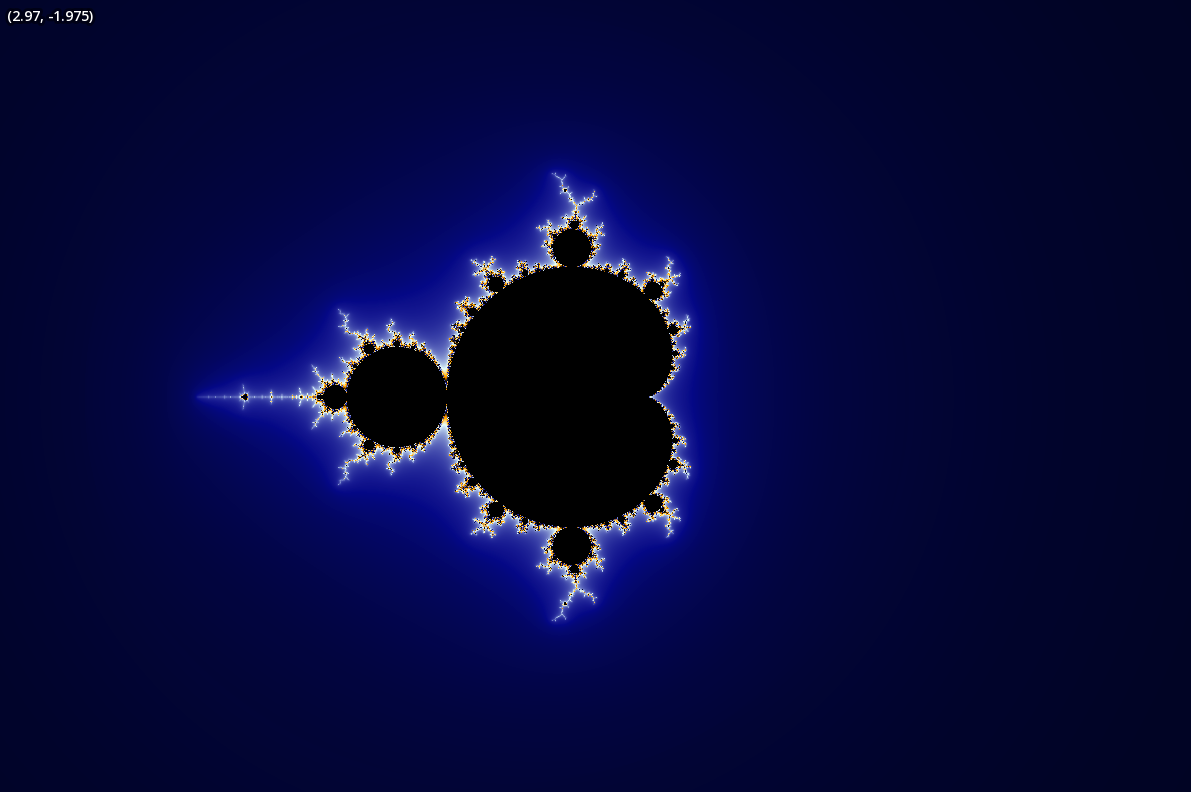
A wide view of the Mandelbrot set. Black points are in the set, coloured points are not.
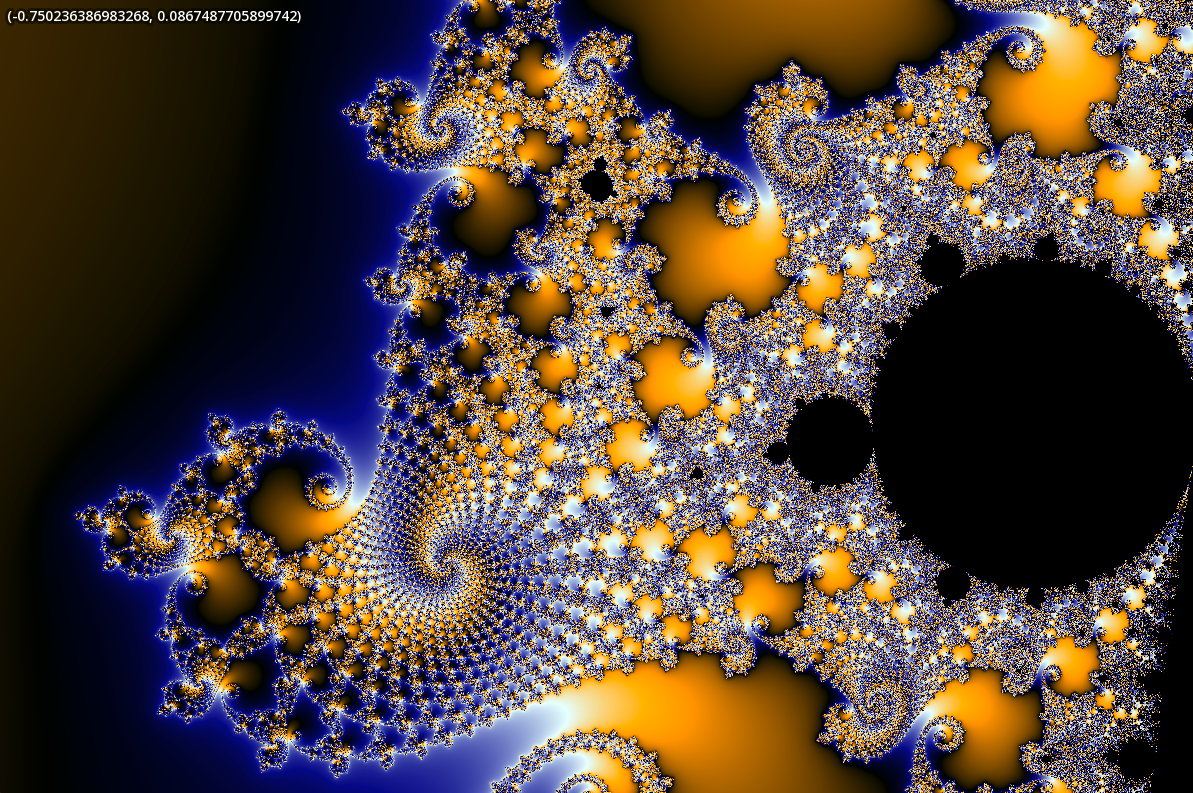
A zoomed in view of the Mandelbrot set.
Typically, in graphics, we represent functions on 2D spaces with the use of sampled textures. This means taking some continuous function defined over a surface (e.g., the albedo or bump map on, say, a tree's bark), and sampling it so that we get a finite, discrete approximation (a 2D array of colours at some resolution). This leads to issues such as aliasing (e.g., jaggies), when you sample at a low frequency but the signal contains high-frequency components. These approximations are also expensive to store — each pixel is typically 4 bytes (a byte per channel, and higher, if you are doing rendering work in HDR), and once you zoom in you lose detail.
In this lab, we consider instead a function on the 2D plane that can be represented algorithmically, with few lines of code, but with arbitrarily high precision (up to the precision you have in your floating point representation). The cost we pay to render such an image representation is now no longer storage, but instead, computation.
A primer on complex numbers
Complex numbers are expressions of the form , where and are real numbers. By definition, is the imaginary unit satisfying . It will become clear that as a vector space, the set of all complex numbers is isomorphic to .
We call the “real part” of the complex number: .
We call the “imaginary part” of the complex number: .
Common operations:
Addition:
Subtraction:
Multiplication:
Division: Not relevant for this lab. But you just multiply numerator and denominator by the complex conjugate of the denominator and then simplify. The complex conjugate of is denoted .
Squaring: Using the above multiplication derivation,
Modulus (norm): The modulus of a complex number is denoted . Note that this is exactly the Euclidean norm applied to the corresponding vector
We associate the complex number to the point in the plane.
The Mandelbrot set
The Mandelbrot set is a 2D set. It is defined as all complex numbers for which the complex sequence given by
does not diverge in absolute value when iterated with an initial value of .
Mandelbrot membership
A point is in the Mandelbrot set if and only if for all . In English, if you iterate through the above sequence and ever get a complex number whose modulus is greater than 2, then is not in the Mandelbrot set.
The Mandelbrot set is of interest because even though it has a simple definition, it displays complex but self-similar, fractal behaviour as you zoom in on its boundary. For example in the zoomed view, you can observe self-similar repetitions of the large black circle on the right on its boundaries. Furthermore, when you visualize the escape times of points not in the Mandelbrot set (these are visualized as non-black in the above images), you get very aesthetically pleasing patterns.
Examples
A trivial point not in the Mandelbrot set
Consider (corresponding to on the plane). By our above fact, , so we already know it's not in the set. But just to make sure,
It should be clear that the norm of this sequence grows without bound, hence is not in the Mandelbrot set.
A slightly less trivial point not in the Mandelbrot set
Consider the point . This corresponds to the 2D point . We start with . Then:
Whose norm , so we can't immediately exclude it based on our above fact. We continue to iterate:
Now check , where the last inequality is because . Then this is , hence is not in the Mandelbrot set.
What about points in the Mandelbrot set?
For a trivial example, it should be clear that starting with will give forever. Furthermore, by our above fact, all points in the Mandelbrot set must belong within the circle at the origin of radius 2. However, in general it is unknown whether the Mandelbrot set is computable. Practically speaking, we will only cull potential candidates as opposed to prove points are definitely in the set.
If you want some visual intuition, look at the wide view and zoomed view. The pixels colored black are the points we have not culled from the Mandelbrot set at the iteration limit we ran to.
Algorithmically checking set membership
Suppose I give you a point on the plane (again, corresponding to ).
Then you can check whether the point is in the Mandelbrot set by the following iterative process. Begin with zX = 0 and zY = 0, representing . Each iteration, compute zPrimeX and zPrimeY with the formula (remember that squaring a complex number gives you a complex number). Check if the modulus of this resulting (zPrimeX, zPrimeY) exceeds 2 . If at any iteration the norm exceeds 2, you know for sure is not in the set.
Otherwise, if the norm remains at most , reassign zX, zY to the corresponding prime'd components and repeat the same steps on the next iteration.
Because you have finite computation time, you will need a maximum number of iterations. For instance, suppose int maxIters = 100. If the modulus never strictly exceeds 2 in the first maxIters iterations, you might be in the set, as so far it hasn't been proved that you're not. For the purposes of our algorithm, we treat as a possible member of the set and return an infinite escape time.
Thus, given a finite computational budget (number of iterations), you can come up with a shortlist of candidates which are in the Mandelbrot set. The more iterations you run, the fewer candidates remain (converging to the true Mandelbrot set).
Escape time
But wait! Just checking set membership gives you a binary function (e.g., black for in the set, white for not). I want colourful pictures — how do I do that?
Answer: We create a spectrum of values instead of a binary value by returning the escape time of a point, instead of just its set membership. If the norm is greater than at an iteration for the first time, we say it has escape time , which we then return from our function as a double. Otherwise, if it does not escape within maxIters iterations (i.e., is possibly in the Mandelbrot set), we return std::numeric_limits<double>::infinity() (from the <limits> library).
Note that if a point is actually in the set, it will never escape, hence why we choose for the escape time of possible contained points.
Problem 1
Implement
double mandelbrot(double cX, double cY, int maxIters)which returns the escape time of a point in the plane (corresponding to ) according to the algorithm described in sections Algorithmically checking set membership and Escape time.
Colouring
Note: background only. This is mostly implemented for you.
We need a way to visualize this now continuous spectrum of values ranging from . There are multiple ways of doing this. By convention, points in the set are coloured black. But for points not in the set, you could for example divide the escape time by maxIters, which yields a grayscale value between that you can then rescale on the range for each of the RGB channels. The problem is that the shading is dependent on the maxIters hyperparameter.
An alternative approach is to define a cyclic gradient on some range of values. In our case we use the range . Then, we can take any scalar real number modulo to get it within the range. Finally, we find the two surrounding “keyframes” in the gradient and linearly interpolate between them to get the colour for .
The definition of a CyclicGradient is given to you for free in CyclicGradient::DEFAULT_GRADIENT. It has a call operator sf::Color CyclicGradient::operator()(double val) such that you can call CyclicGradient::DEFAULT_GRADIENT(n) where n is a double, and get a colour corresponding to iteration .
When you're done, if you have extra time, feel free to play around with the gradient so long as it remains aesthetically pleasing.
The camera
We've now defined a world space on the 2D plane — the colour at world point is the colour received by passing the iteration at which is greater than the escape radius (for now, ) to CyclicGradient::DEFAULT_GRADIENT. If the point does not escape within maxIters iterations, instead we colour the point black.
We now need a camera which can zoom and pan within this world space. Similarly to an sf::View, our app has fields for the world-space subrectangle that is being rendered to the window (the view of the world). These are the mMinPointWorld and mMaxPointWorld fields in MandelbrotViewer:
mMinPointWorldstores the minimum and world-space coords being rendered (corresponding to the bottom-left of the world).mMaxPointWorldstores the maximum and world-space coords being rendered (corresponding to the top-right of the world).
In our case, this world rectangle is always rendered to fill the entire window. We have two buffers which act as the “film” of the camera.
mViewBufferis ansf::Image(Documentation) which is our CPU-side in-memory buffer that we will render into, pixel-by-pixel.mViewBufferGPUis asf::Texture, i.e., a GPU-side VRAM buffer, which we will copy into frommViewBuffer.
The latter also allows us to create a sf::Sprite.
Note that the window coordinates have their origin at the top-left of the window, with y pointing down and x to the right, and with as the coordinate of the bottom-right of its bottom-right-most pixel. However, the world coordinates have y pointing up, and in general will have different scale than the window coordinates.
(Trivial) Problem 2
Implement
void MandelbrotViewer::copyViewBufferToGPU()which just loads mViewBuffer into mViewBufferGPU as a one-liner. You may wish to reference the documentation.
Problem 3
Implement
sf::Vector2<double> MandelbrotViewer::windowPosToWorld(const sf::Vector2<double>& pWindow)which takes a point in window coordinates, and makes use of the world-space view bounds and the mWindowSize field to compute the corresponding world-space coordinate that is shown at that window pixel.
Zooming and resizing
Panning is implemented for you.
We compute zooms by taking the total “distance” scrolled (as reported by SFML), and then scaling the size of the world-space view by , where is given by ZOOM_EXPONENT_BASE = 1.01. Exponentiating like this means that there is a constant “factor” of scaling per distance scrolled on the scrollwheel (analogous: compounding interest).
We handle resizing by updating the world-space view bounds such that their rectangle's aspect ratio matches the new window size. Furthermore, the center of the new world-space rectangle matches the old center before the resize. The world-space rectangle's size in each dimension is multiplied by the same factor as by which the window was resized in the respective dimension. This has the effect of not shrinking, nor zooming the image itself, only cropping or extending the seen pixels.
Resizing the window also means having to resize the view buffers, such that they always have exactly the same dimensions in pixels as the window. This is mostly done for you.
Complete the TODOs in the following:
Problem 4 (Zoom)
Implement
void MandelbrotViewer::handleZoom(double scrollDistance, sf::Vector2i mousePosition)according to the logic described above. After the zoom, the new world-coordinate bounds will have size (worldViewFactor * (orig world width), worldViewFactor * (orig world height)), and the user's cursor should point at exactly the same thing they pointed at before the zoom.
Problem 5 (Resize)
Implement the TODOs in
void MandelbrotViewer::handleWindowResize(sf::Vector2u newSize)according to the logic described above. Update mMinPointWorld and mMaxPointWorld such that the world view is the same aspect ratio as the new window size (such that the view is not distorted). The new world view should have the same world center as the old one, and the resize should only give the effect of cropping or extending new pixels, not zooming in or out.
You will additionally need to resize the gpu-side copy of the view buffer, to match the new window size.
Drawing
We can draw into our mViewBuffer using sf::Image's setPixel method, which has signature void sf::Image::setPixel(sf::Vector2u coords, sf::Color color). Drawing is done by using our windowPosToWorld implementation from Problem 3 to convert the window-coordinates of the center of each pixel to a world-coordinates point. You will then need your mandelbrot implementation to determine the escape time at this point, which you can then use to color the pixel.
Problem 6
Implement
void MandelbrotViewer::drawIntoViewBuffer(int maxIters)which renders all of mViewBuffer according to the description above and in the comments. In particular, calls to mandelbrot should use the given maxIters.
Upon completion of all the problems up to now, you should get something like
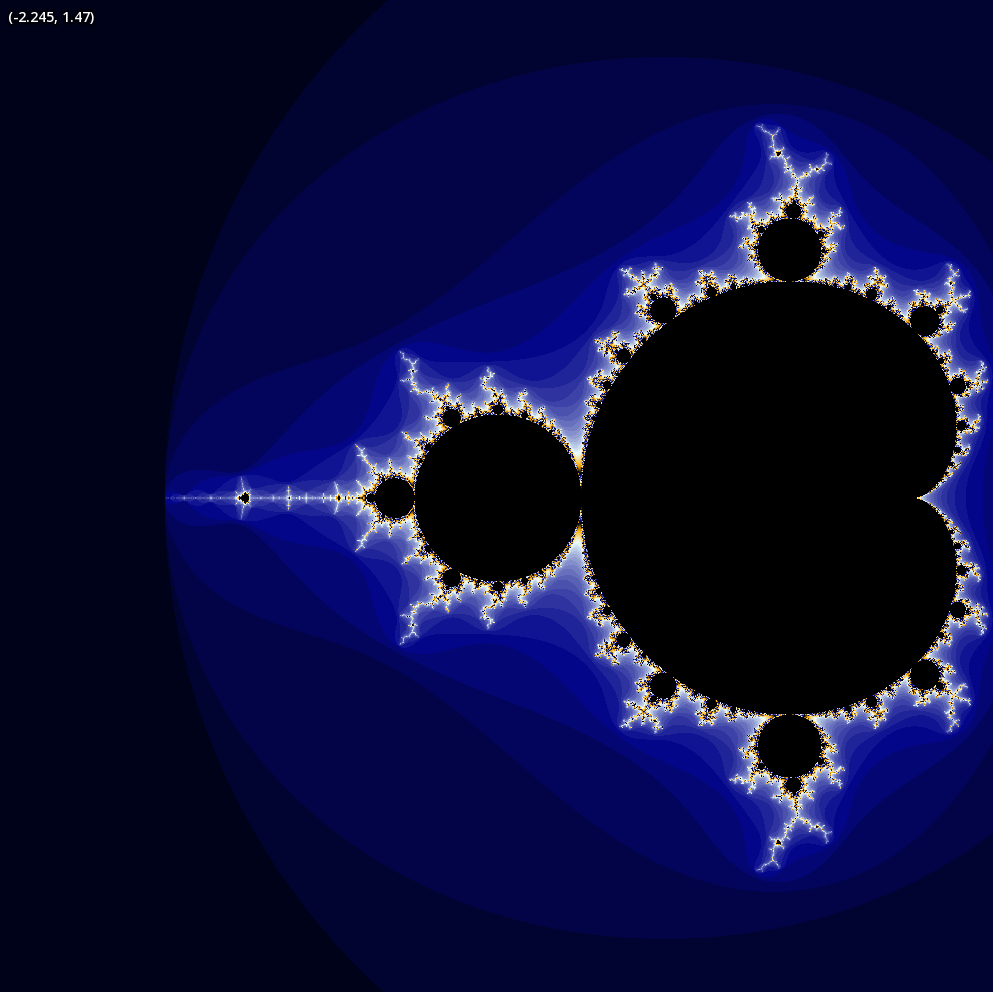
A rendering of Mandelbrot set escape times without smoothing.
Note that the coordinates at the top-left track your cursor using your implementation of windowPosToWorld.
Smoothing
To achieve a smooth image, we want a way of calculating partial iterations. Take it as given (you may look up details after the lab) that the formula for calculating a fractional iteration count is
where is the discrete iteration at which you first exceed the escape radius in the complex plane (i.e., the modulus exceeds, say, 2), and is the corresponding newest value that first has a modulus which is greater than the escape radius.
Problem 7
Copy and paste your implementation of mandelbrot into mandelbrotSmooth and return the above fractional iteration count instead of the discrete iteration count upon determining that is not in the Mandelbrot set.
You will need to increase the escape radius (originally 2) to avoid artifacts. Note that the more you increase it, the more computationally expensive the procedure becomes. However, it is always correct in the sense that, if the sequence were to diverge beyond 2, it will eventually diverge beyond any positive number. We recommend an escape radius of 4.
Hint: <cmath> has std::log and std::sqrt, and LOG_2 (i.e., ) is provided to you as a constant in mandelbrot.h.
Upon completion of Problem 7, you should now get images as shown in the Introduction. Note that we have implemented logic for you that exponentially increases the iteration count from 50 to 3200 (doubling at each step) as long as you don't move or resize the window during a frame. Once you move, the rendering restarts at 50 iterations.
Written problems
In lab4.txt, answer the following in 1-2 sentences each:
- In our doubling-iteration scheme, why do we start from a low number? Consider effects on rendering time/responsiveness and that we must finish a call to
mandelbrotSmoothfor each pixel before going on to the next frame. - Propose a way to increase efficiency of rendering for high iteration counts, exploiting that the rendering of each pixel is independent of the other pixels, and assuming you can use multiple computers/cores/threads at the same time (whatever level of abstraction you're comfortable with). In particular, suppose you can coordinate these computers by having one of them delegate tasks to others and wait for their results.
- At “farther away” zooms with 1 centered sample per pixel, some regions of the set will look like speckled noise (try zooming into the zoomed view!), with jaggies at the boundary of the set. Consider and discuss what would happen if we sampled at the center of 4 subpixels per pixel and averaged the colors instead, from both a visual perspective and a performance perspective.